
Archivarix Broken Links Recovery: Free WordPress Plugin for Finding and Fixing Broken Links
Over time, external links in WordPress posts inevitably break - pages get deleted, domains expire, videos become unavailable. Checking hundreds or thousands of links manually is impractical. Archivarix Broken Links Recovery automates this process: the plugin scans your content, finds broken links, and replaces them with working copies from the Wayback Machine.
When searching for archived copies, the plugin uses the post's publication date as a timestamp, so replaced links point to the most relevant version of the original page.
Smart Link Verification
A simple HTTP status check is often not enough. A link may return a 200 status while showing a parking page, a "soft 404," or an entirely different website. The plugin uses multi-level verification to detect such cases:
HTTP errors - 4xx, 5xx, timeouts, DNS failures
Redirect analysis - detects redirects to a different domain or to the site's homepage, which usually means the original page no longer exists
Parked domain detection - recognizes over 30 parking service signatures (Sedo, GoDaddy, Namecheap, and others)
Soft 404 detection - pages that return a 200 status but actually display an error page
Content-Type mismatch -when a link that should lead to an HTML page returns something else
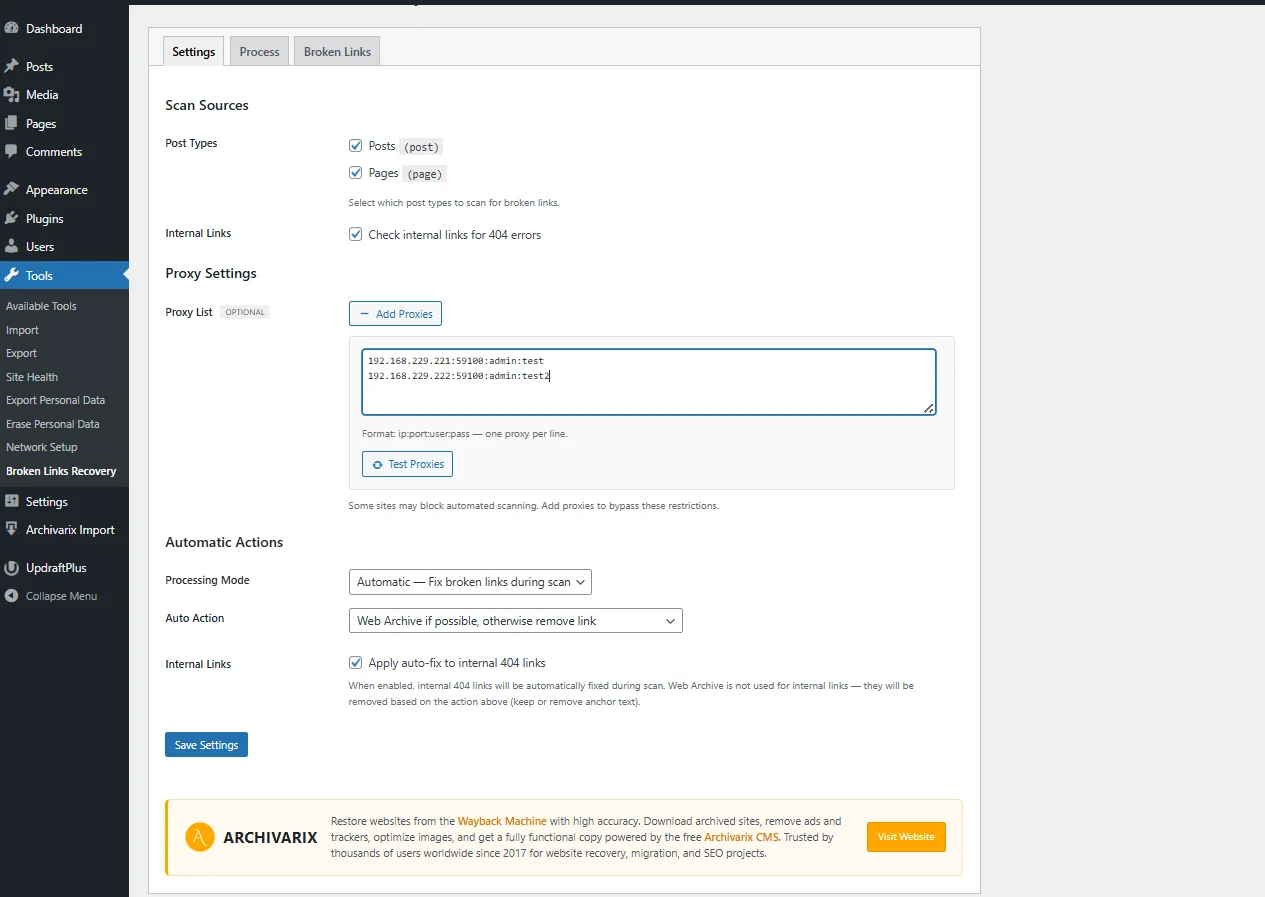
Proxy support - configure an HTTP proxy for external link checking to avoid blocks from frequently checked domains and social media platforms.
Video and Social Media
Standard HTTP checks don't work well with social platforms - they often block bots or return incorrect responses. The plugin uses the platforms' own APIs:
YouTube, Vimeo, TikTok - video availability is verified via the oEmbed API
Twitter/X, LinkedIn, Instagram, Facebook, Pinterest - dedicated checks for each platform
The plugin also extracts and verifies embedded videos from iframes, Gutenberg blocks, [embed] shortcodes, and plain oEmbed URLs in content.
Two Operating Modes
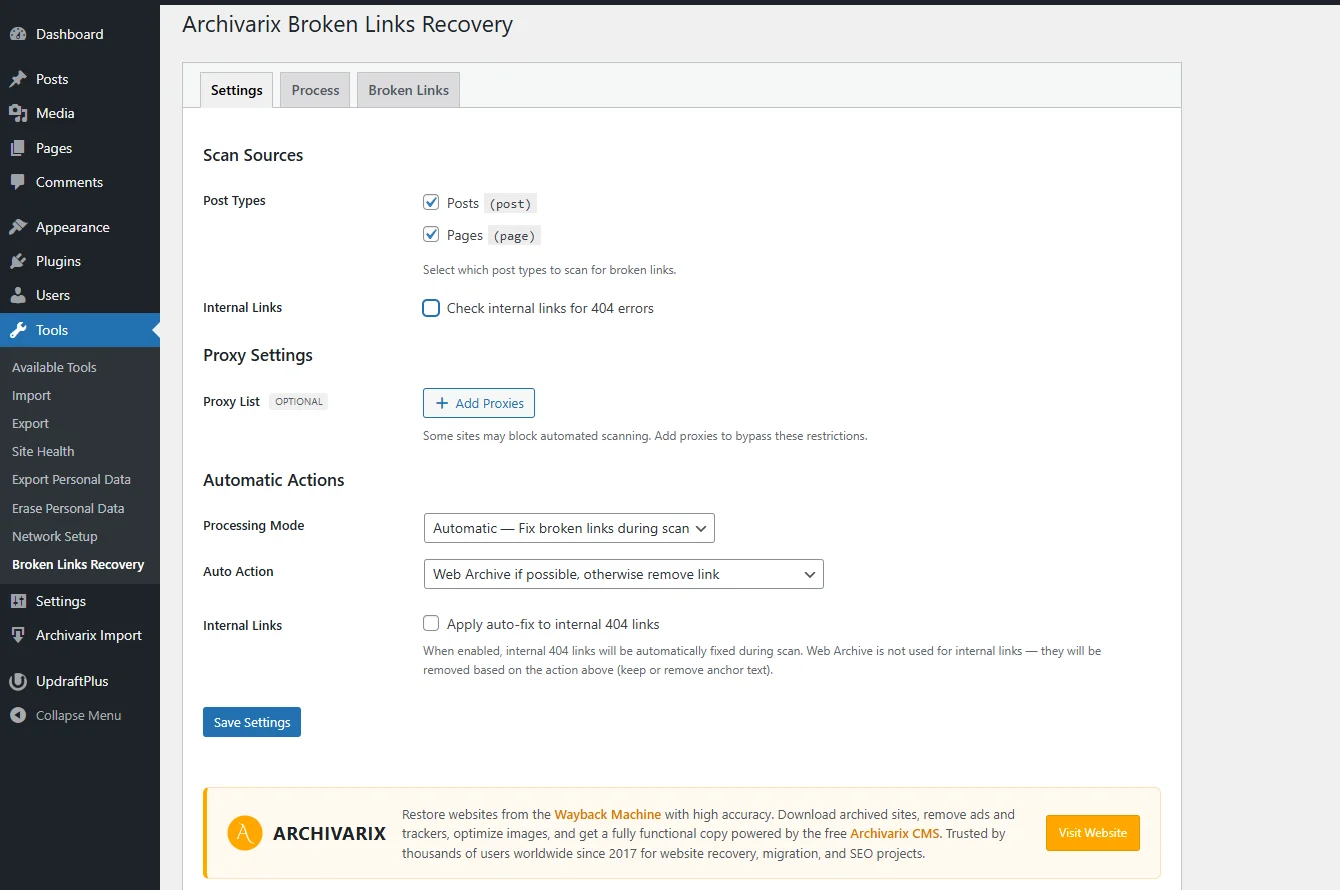
In the Settings tab, you can choose how the plugin handles broken links:
Automatic mode is suited for large sites where reviewing every link manually is impractical. The plugin automatically replaces broken links with Wayback Machine copies. If no archived copy is available, the hyperlink is removed and the anchor text remains visible.
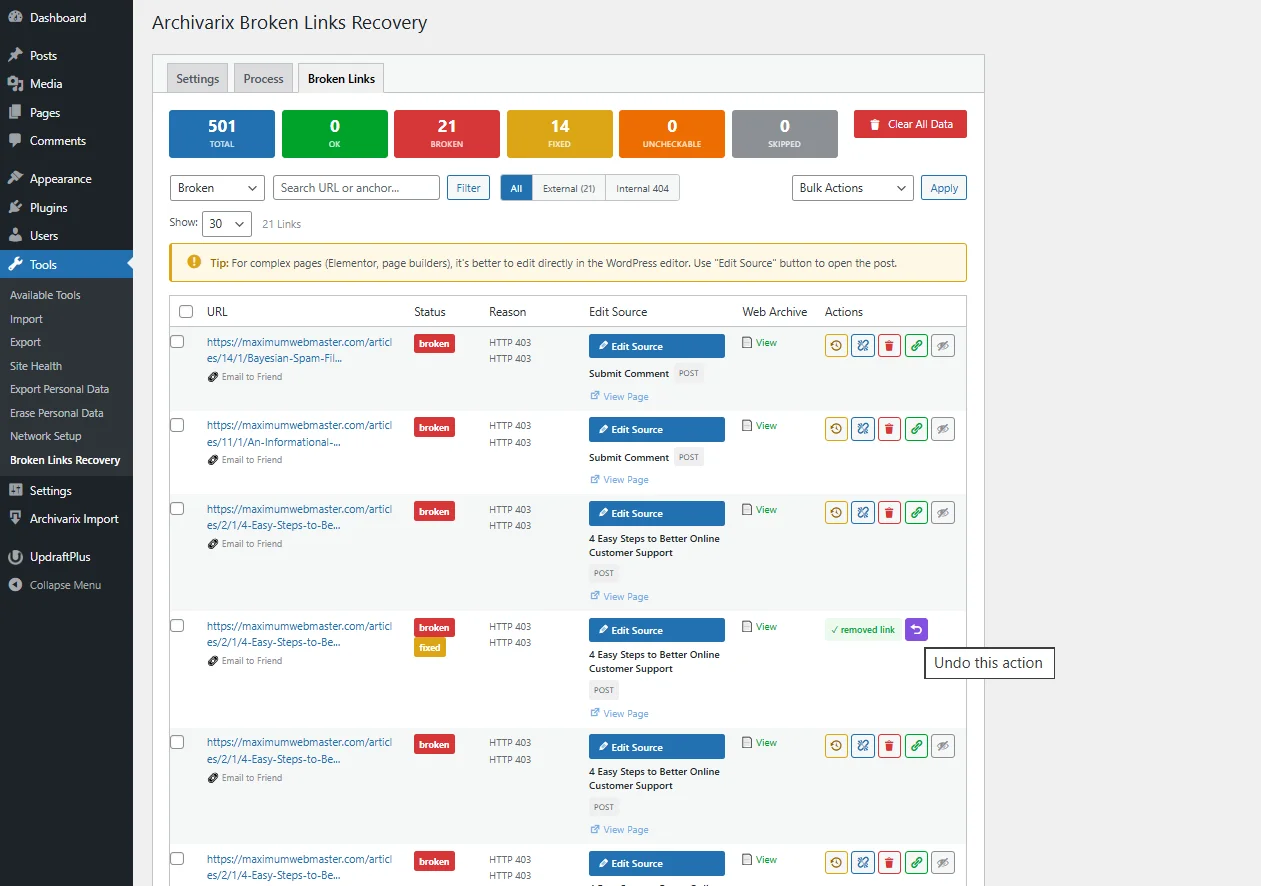
Manual mode gives you full control. In the Broken Links tab, you can review each broken link and choose an action:
- Replace with a Wayback Machine copy
- Replace with a custom URL
- Remove the link (keep the anchor text)
- Remove the link along with the text
- Add to the whitelist (skip in future scans)
Internal Link Checking
The plugin also checks links within your own site. It uses a hybrid approach: first a fast WordPress database lookup to confirm the target post/page exists, then an HTTP check as a fallback for URLs that couldn't be resolved through the database. This catches broken links from deleted pages, malfunctioning plugins, or content restructuring.
Background Processing
All scanning and checking runs in the background using the WP Background Processing library. You can close your browser tab and come back later - the process continues on the server. The Process tab shows current progress, and you can pause or stop the scan at any time.
Large sites with thousands of links are handled without timeouts or memory issues.
What the Plugin Scans
In the Settings tab, you can choose which content sources to include:
- Posts and pages
- Custom post types, if your WordPress site has any
Installation
1. In WordPress admin, go to **Plugins → Add New** and search for "Archivarix Broken Links Recovery"
2. Install and activate the plugin
3. Navigate to **Tools → Broken Links Recovery**
4. On the **Settings** tab, select content sources and operating mode
5. Go to the **Process** tab and click **Start Scan**
The plugin is free and open source. — https://wordpress.org/plugins/archivarix-broken-links-recovery/
The use of article materials is allowed only if the link to the source is posted: https://archivarix.com/en/blog/broken-links-recovery/

Retrace is a new Archivarix service for tracing where an image came from. You give it a photo, a GIF or a short video, and it looks for the same image on the open web and puts together a report: where…
Hi everyone,
To celebrate our anniversary, we’re bringing back our best offer of the year: up to 100% bonus credit when you add funds. We only offer a bonus this big on our anniversary — once a year.…
Tube Search now has a section of free YouTube tools. These are small utilities that solve specific everyday tasks: stepping through a video frame by frame, extracting hidden tags, checking whether a c…
You found the video you needed on YouTube, but you do not want to watch the whole thing just for a couple of lines. Or you need the text of a lecture to translate it, quote it, or simply skim through …
Open any article from a decade ago and click through the links in it. There is a good chance that some of them lead nowhere. Instead of the page you wanted, you get a 404 error, a parked domain advert…
The web keeps falling apart. Pages go offline, accounts get deleted, papers slip behind paywalls, projects shut down. Usually a copy survives somewhere, in the Wayback Machine, archive.today, Common C…
When you find a deleted YouTube video through Tube Search, you typically get metadata: a title, description, upload date, and sometimes subtitles. That is already useful. But reading through raw subti…
Tube Search is a search engine for archived YouTube data. The service aggregates information from multiple public sources: the Wayback Machine (Internet Archive), Common Crawl, and various collected Y…
Over time, external links in WordPress posts inevitably break, pages get deleted, domains expire, videos become unavailable. Checking hundreds or thousands of links manually is impractical. Archivarix…
One trillion saved pages. Over 99 petabytes of data. Hundreds of crawls running simultaneously every day. Behind these numbers lies a question that everyone who professionally works with web archives …